Shopify Analytics vs Google Analytics 4 for Conversion Tracking
Shopify captures all revenue server-side while GA4 misses 10-20% due to browser limitations.
Shopify Analytics and GA4 rarely show matching revenue figures for the same week. That mismatch reflects the fact that the two platforms measure different events entirely: Shopify records a transaction the moment payment clears at the server level, while GA4 fires its purchase event only when its tracking code loads in the customer's browser on the order confirmation page. Those are two separate moments in the life of an order, and nothing guarantees they land together.
The gap between them traces back to GA4's dependence on the browser actually executing that tracking code. Ad blockers, refused cookie consent, and privacy settings can each stop the GA4 script from firing, and Ruler Analytics puts the resulting discrepancy between GA4 and Shopify at a typical 10 to 20%, a figure Shopify's own server-side record never has to absorb since it doesn't depend on anything happening in the customer's browser. Ruler Analytics traces the most common causes to ad blockers, cookie settings that strip attribution, technical failures in the checkout tracking code, and payment redirects that interrupt the GA4 session. That last cause deserves particular attention: when checkout routes through a third-party payment page like PayPal or Klarna and back, GA4 can either misattribute the sale to the payment provider as the traffic source or lose the session altogether, while Shopify logs the sale without any dependency on that redirect completing cleanly.
Session counting adds a second layer to the divergence, independent of anything going wrong. Shopify resets a session at midnight no matter what the user is doing, while GA4 closes a session after a period of inactivity, so a single late-night visit can register as one session in GA4 and two in Shopify. Shopify also counts direct URL visits, page refreshes, and some bot traffic that GA4 filters out of its reporting. Shopify's session totals typically run higher than GA4's as a result, and a higher session count mechanically produces a lower conversion rate even when the number of actual orders hasn't moved at all.
When a gap signals a real tracking problem
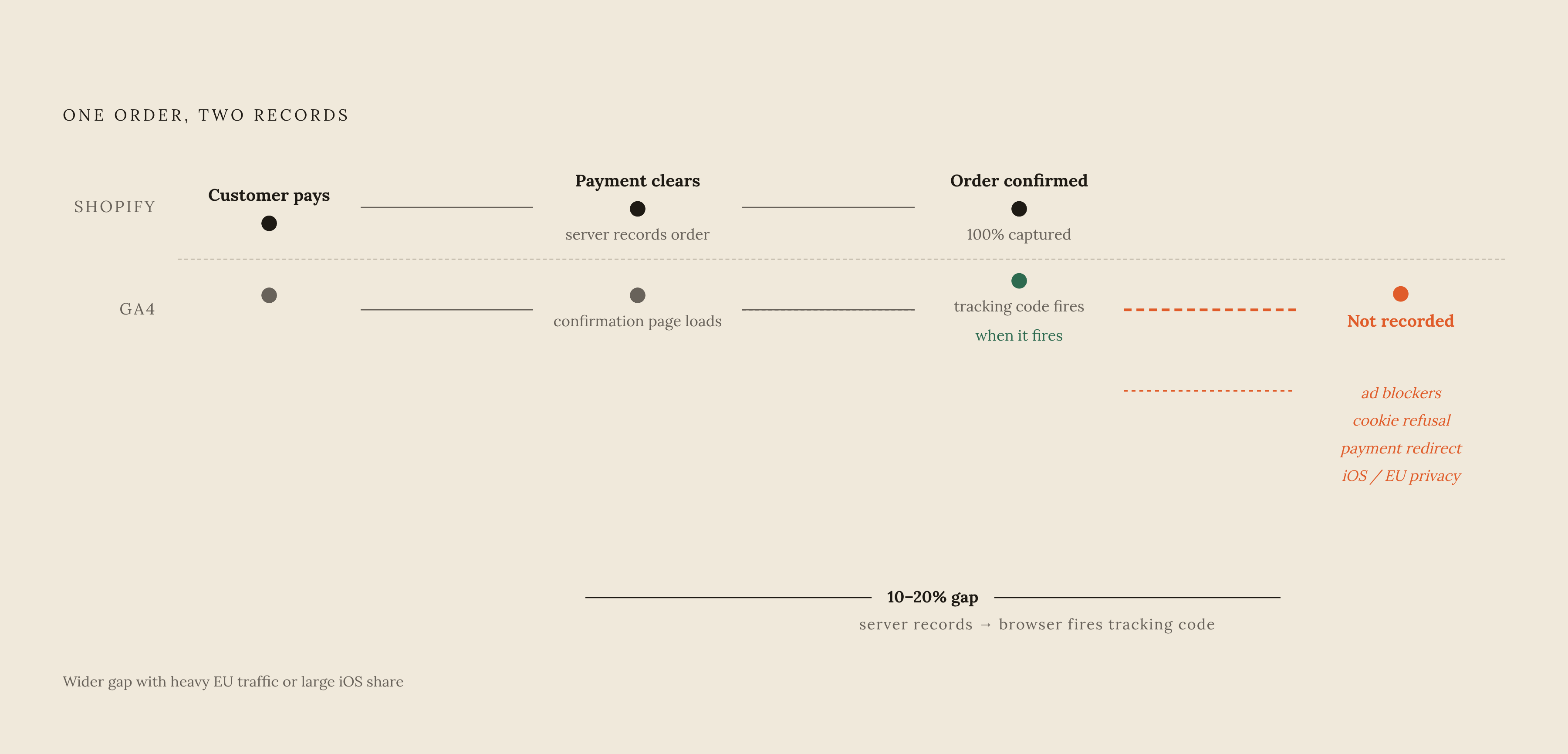
Analyzify places that typical range at 10 to 20% for most merchants, and notes the gap tends to widen further for stores with heavy EU traffic or a large share of iOS users, where consent requirements and privacy enforcement are stricter. A merchant checking this week's numbers against that range has a real answer to whether anything needs attention.
A gap that runs well past that range points to something specific and fixable. A misconfigured payment provider referral exclusion can cause the processor itself to appear as the traffic source in GA4 rather than the channel that actually brought the customer in. A theme update or a newly installed app can quietly break the tracking code partway through checkout without triggering any visible error. Duplicate purchase events, where both Shopify's native pixel and a third-party tag fire on the same confirmation page, can push GA4's purchase count toward roughly twice Shopify's actual order count. Bot traffic inflating Shopify's session denominator can make the conversion rate look alarmingly low even while revenue itself stays healthy. Essential Apps recommends a fast gut check: compare Shopify's order count for a given week against GA4's purchase event count for that same period.
What Shopify Analytics is the authoritative source for
Shopify Analytics holds the authoritative record for confirmed revenue, order counts, refunds, and product-level transaction detail, because every figure is captured at the server level, with no dependency on what happens in a customer's browser. That makes it the right source for reporting revenue to finance teams and for any accounting or tax purpose where the number has to reconcile against money that actually moved. It's equally authoritative for tracking performance at the product and variant level, for refund, shipping, and fulfillment reporting, and for customer data tied directly to Shopify profiles and segments. Where Shopify and GA4 disagree on order counts, Ruler Analytics considers Shopify almost certainly the number closer to the truth.
That authority runs out at the edge of the transaction itself. Shopify Analytics doesn't break out where visitors are dropping off in the funnel by default, so add-to-cart rate, checkout initiation rate, and checkout completion rate sit outside its native reporting. Its attribution model defaults to last-click, crediting whichever channel produced the final click before purchase, and that default systematically undervalues the channels that introduce a customer to a brand in the first place, like prospecting ads on Meta or influencer content that drives awareness long before the sale closes. A merchant reading Shopify's attribution at face value will see bottom-of-funnel channels look disproportionately valuable, simply because they happen to close the transaction, and the channels that built the demand in the first place will look like they did nothing. Analyzify is blunt about where that leaves a merchant: Shopify's own data won't show how a customer arrived, which channels influenced the decision along the way, or how a given campaign actually performed, because that visibility belongs to GA4.
GA4's authoritative data, and the setup accuracy depends on
GA4's authority sits on the other side of that transaction entirely: understanding how visitors find the store, what they do before they buy, where they abandon the funnel, and how traffic sources compare against each other, none of which Shopify Analytics is built to answer. That makes it the right tool for measuring paid campaign performance across Google Ads, Meta, and TikTok.
GA4's event-based model is a genuine step forward from what preceded it. Clickforest points out that Universal Analytics would have counted a customer browsing Monday and ordering Thursday as two disconnected sessions, while GA4 correctly recognizes that as one person on a four-day purchase journey, which matters for a shopping pattern that rarely resolves in a single visit. GA4 extends that same logic across devices, treating a customer who discovers a product on mobile and completes the purchase on desktop as a single journey rather than two unrelated sessions. Stores with enough data volume also get access to predictive metrics inside GA4, including purchase probability and churn risk, neither of which has an equivalent in Shopify's native reporting.
None of that accuracy is automatic. GA4's picture is only as good as its implementation, in a way Shopify's server-side record doesn't have to worry about. The native Shopify Google & YouTube app gets a store basic tracking running without touching any code, but it hands over limited control of event structure and the data sent, and standard pixel tracking of this kind now captures only 70 to 80% of actual conversions as of 2026, which is enough for a baseline view but not enough to support serious attribution work or conversion rate testing. Google Tag Manager gives a merchant full control over event firing and the data layer, at the cost of more configuration discipline, particularly after a theme update or app install touches the checkout flow. Essential Apps warns that any change to the checkout template can break event firing if the tags aren't updated to match, and that failure doesn't announce itself: GA4's picture of funnel behavior can quietly degrade while the dashboard keeps reporting numbers that look plausible. GA4's attribution model itself is data-driven for accounts with sufficient volume and falls back to last-click otherwise, though first-click, linear, and time-decay models are available as alternatives, each surfacing the contribution of awareness channels that Shopify's last-click default misses by design.
The specific conversion decisions that belong to Shopify data, and those that belong to GA4
Running a store well on this data doesn't come down to picking a favorite platform. It comes down to knowing which platform answers the specific question in front of you, because the question itself determines which number is the right one to pull. Reporting actual revenue to stakeholders, finance teams, or investors should always draw on Shopify's server-confirmed figure, since that number reflects money that has actually moved rather than a browser event that may or may not have fired. Calculating a true conversion rate for overall store health should use Shopify's order count as the numerator, with the caveat that its session count methodology differs and will produce a different denominator. Evaluating which SKUs and variants are generating orders and refunds, and understanding how new and returning customers split against actual purchase history, both belong to Shopify's transaction-level detail, as does assessing the revenue impact of a change to a fulfillment or returns policy.
GA4 owns a different set of questions. Diagnosing exactly where in the checkout process visitors abandon depends on GA4's sequence of begin_checkout, add_shipping_info, add_payment_info, and purchase events, which is the only place that breakdown exists. Evaluating which paid channels bring high-engagement traffic versus low-quality clicks, attributing conversions across journeys that span multiple sessions and devices where a single last-click model would distort the picture, comparing landing page performance across traffic sources, and identifying which audience segments convert at meaningfully different rates by device, location, or channel are all GA4 territory.
Some decisions only resolve correctly when both platforms are read together. Budget allocation across channels is the clearest case: GA4 shows which channels are driving the most qualified traffic, Shopify confirms which of those visits actually turned into closed orders, and reading both side by side catches the specific failure where GA4 undercounts conversions from channels that happen to drive more privacy-conscious or mobile-heavy audiences. The stakes of getting this wrong are concrete: if a channel is driving more mobile or privacy-regulated traffic, GA4 will systematically undercount its conversions relative to what Shopify's revenue data shows actually closed, and a budget decision made on GA4 numbers alone will quietly starve a channel that's performing better than it appears.
Where standard tracking breaks for Shopify stores
The tracking failures that do the most damage on Shopify rarely throw an error. They just sit there, quietly, making one platform's numbers wrong while everything looks normal on the surface. Recognizing the failure patterns matters more than trusting whatever the default setup happens to be doing.
Duplicate purchase events are the most inflating of these failures. They occur when both Shopify's native pixel and a separate third-party tag fire a purchase event on the same confirmation page, and the result is every order getting counted twice inside GA4. Essential Apps offers a clean diagnostic for this: if GA4's purchase count sits consistently close to double the Shopify order count, duplicate firing is almost certainly the cause, and the way to confirm it is checking GA4's debug mode for multiple purchase events attached to the same transaction ID.
Payment provider redirects cause a quieter kind of damage. Checkouts that route through PayPal, Klarna, or a similar provider before returning to the confirmation page can break the UTM parameters that preserve where the customer originally came from, so a conversion that actually came from a paid campaign ends up logged in GA4 as direct traffic. The fix is making sure the payment processor's redirect handling passes those UTM parameters through intact, or moving to server-side tracking that captures the conversion event before the redirect happens at all.
Checkout funnel steps can also go missing after a theme update or a new app install touches the checkout flow, since GA4 tracks checkout as a sequence of distinct events and any one of them can stop firing without taking the overall purchase event down with it, leaving a funnel report with gaps that make abandonment analysis meaningless. The fix requires re-validating every individual funnel event inside GA4's debug mode after any change touches checkout, since a silent gap in the middle of the sequence is exactly the kind of failure a surface check won't catch.
One deadline has already forced this issue across the entire platform. Clickforest had flagged that Shopify's checkout.liquid deprecation was set to stop on August 26, 2026, pushing all non-Plus stores onto extensible checkout, and any store that had client-side tracking built directly into checkout.liquid had that tracking broken once the migration took effect. Server-side tracking is the fix built to survive that kind of migration: it recovers conversions that would otherwise be lost to browser-side blocking, and it isn't tied to the checkout template in a way that a forced platform migration can break.