
Session Replay Analysis for DTC Conversion Friction Identification
Session replay uncovers checkout friction that aggregate metrics miss.
Session replay analysis helps DTC brands find conversion friction by linking losses in the funnel to what shoppers went through. Its value comes from a structured workflow. Filtering high-intent sessions, tagging recurring problems, and validating targeted fixes turns behavioral evidence into changes that can move revenue.
Why aggregate metrics leave DTC brands guessing at checkout
A DTC brand sees checkout conversion fall and starts testing the copy on its buttons. Engineering sees no errors, so the team keeps adjusting the message while a mobile layout bug blocks payment entry. The test addresses the wrong problem entirely. A funnel can show the decline between checkout steps, but it cannot show a sticky header covering an input or an ambiguous coupon error driving an exit. Without that evidence, optimization becomes guesswork.
The same diagnostic gap appears before checkout. A shipping calculator may take too long to respond, an image gallery may fail on a slow connection, or a lead capture form may have too many fields to fill in. Each problem can depress a metric without explaining itself in the aggregate. Behavioral data supplies the missing context about the shopper’s experience. Session replay makes that context available for inspection, so teams can investigate the obstruction.
What session replay actually captures and what it cannot
Session replay reconstructs a visit from structured events. A JavaScript snippet captures timestamped DOM mutations, which are structural page changes, and interactions including clicks, scrolls, taps, form inputs, and page transitions. Playback re-renders those events against a page snapshot. The result looks like video but remains queryable. Ordinary’s session replay documentation describes a scrubbable timeline that connects clicks, checkout steps, and session outcomes to the visual reconstruction.
Coverage has firm boundaries that affect interpretation. In Ordinary’s Shopify replay, visual recording ends when the shopper reaches Shopify’s own checkout pages, while the timeline continues to track steps reached and how the session ended. The summary reports time spent in checkout, but there is no pixel-level recording of payment fields. Bots, crawlers, and visits below a configurable minimum are excluded, while high-traffic stores have sampled daily recording targets recalculated nightly. AI shopping agents can also leave empty replays because they generate no scroll, click, or hover data.
Privacy further determines which sessions become available. Form values are masked in the browser before transmission. The recording requirements described in the notes call for affirmative consent from EU/EEA, UK, and Brazil visitors before recording begins. Switzerland requires transparent disclosure and a right to object, with affirmative consent for unexpected or high-risk processing. Consent requirements can therefore explain why a merchant sees fewer recordings than expected.
How modern tools surface friction without manual screening
Modern replay platforms reduce the screening burden by applying machine learning to the event stream and scoring sessions for friction severity. Signals include erratic hovering over unresponsive elements, repeated scrolling within a section, and long pauses before submission. Rage clicks flag rapid bursts on an unresponsive element. Dead clicks flag individual clicks that visibly did nothing. These signals identify candidates for review.
Ordinary’s help documentation describes ranked “Top friction points” linked to the recordings that support each finding. Leading platforms also support natural language queries, so an analyst can ask for sessions from shoppers who abandoned payment on mobile without setting up a stack of filters. AI summaries describe what happened before the analyst decides whether to watch. Analysts can then choose which full sessions to watch to check the findings. For small DTC teams, this turns a time-intensive research method into a prioritized work queue without removing the need for judgment.
Starting with a metric, not a recording library
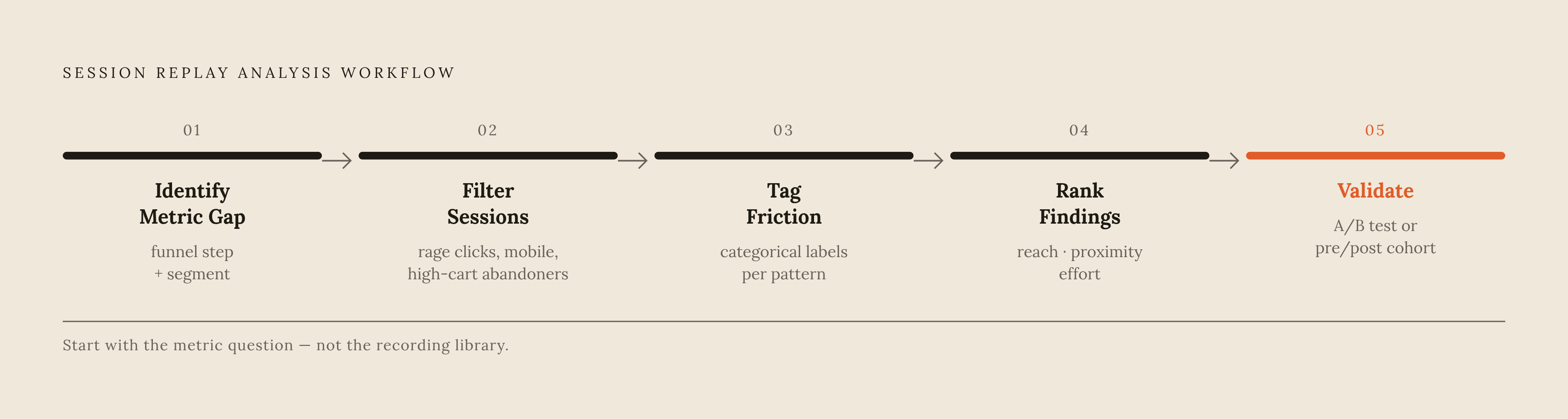
The practical workflow begins by documenting the funnel step losing shoppers, the affected segment, and the size of the gap. The segment may be defined by device, traffic source, or whether visitors are new or returning. This is an analytical discipline. The team should have a question before anyone opens a recording, whichever platform it uses.
Analytics identifies the leak, targeted replays expose recurring behavior, and tagged patterns become candidates for fixes that can be shipped and validated. Checkout payment entry and shipping calculators are useful starting points, as are product-page add-to-cart paths and lead capture forms. Each has a defined action to investigate. Reviewing a modest set of relevant sessions keeps the inquiry focused on whether a pattern repeats.
The comparison group is as important as the failing group. Converters and abandoners at the same step, on the same device and from the same traffic source, provide a sharper contrast than unrelated sessions. Differences between them can support a testable explanation. That comparison also keeps an unusual interaction from being mistaken for a barrier that affects everyone.
Filtering for the sessions that reveal DTC-specific friction
For checkout investigations, the strongest starting point is the affected segment that reached payment but did not complete. Rage clicks and dead clicks can narrow that group to sessions with visible signs of difficulty. Teams should look at mobile sessions on their own because keyboards and forms work together differently than they do in desktop layouts. High-cart-value abandoners and returning visitors who failed to convert add a commercial lens.
Product-page investigations require a different selection. Sessions that viewed a product without adding it to cart are relevant, particularly on mobile and from paid traffic sources where intent is established. For forms, long pauses before submission and repeated field edits offer clues about unclear copy or layout. The filter must follow the question being asked. Very short visits, bot-adjacent sessions, and pages outside the investigated funnel dilute the first pass.
Sessions in A/B experiments should be recorded so that behavior can be examined by variant. This makes it possible to investigate whether the changed experience produced the intended interaction, rather than treating an outcome difference as a complete explanation.
Mapping what you see to friction patterns at each funnel stage
Each relevant replay needs a categorical tag identifying the friction and the step where it appeared. Labels such as “field obscured by keyboard” or “coupon error unclear” are more useful than a narrative account of the visit. Repetition turns the label into a pattern. Teams should still record a problem that appears only once, but it has less reason to go to the top of the list.
On the product page, repeated clicks on an image that does not zoom show a dead-click pattern, while pauses before shoppers choose a size may suggest that information is missing. Scrolling past the add-to-cart button can point toward placement or visibility. When shoppers remove items from the cart, keep returning from checkout, or run into promo-code errors, they may be hesitating over totals or information shown too late. These observations support hypotheses about the shopper’s thoughts.
DeepSync documents a checkout case in which payment-step abandoners repeatedly scrolled between the order summary and card fields. A sticky order summary covered the CVV field when the mobile keyboard opened. The pattern had a specific physical cause. Collapsing the summary into an expandable drawer during payment entry raised mobile checkout completion. Where visual recording stops at the checkout boundary, step progression and time spent can still flag difficulty, but they cannot establish that same pixel-level diagnosis.
Translating tagged friction into a prioritized fix list
The lesson for a team with tagged findings is to rank them by reach, proximity to purchase, and implementation effort. Reach reflects how often the pattern appeared in the reviewed sessions. Proximity distinguishes a payment obstruction from an earlier product-page hesitation. Checkout friction generally deserves the first opportunity for action because the shopper has already cleared the upstream barriers. Effort then separates changes that can ship quickly from those requiring a theme rebuild or developer sprint.
A clearer error message or field label should not wait behind a complex infrastructure change. The same applies to a contained interface adjustment when the evidence supports it. Each candidate needs one sentence linking the change, the obstruction, and the intended metric. “Collapsing the order summary during payment entry will reduce CVV-field obscuration on mobile, increasing payment-step completion” provides that link. It makes the fix testable without turning the hypothesis into a research formality.
Bookmarked evidence keeps the action connected to its cause. A note should explain why each saved session supports the proposed change, so teammates can examine the reasoning without repeating the original investigation. Ordinary preserves bookmarked recordings beyond its standard 30-day retention window and shares notes across the team. That record gives each fix an auditable basis.
Validating that a fix actually moved the metric
Validation returns to the step-completion metric named in the hypothesis. Teams should check a fix to payment entry by looking at payment-step completion. The baseline must remain specific to that question. Otherwise, changes elsewhere in the funnel can obscure whether the repair worked.
Where traffic supports a clean experiment, an A/B test compares the fix with the original experience. Replay for each variant then helps show whether shoppers’ behavior changed as intended. Small DTC teams may not have enough traffic for that design. A pre/post comparison is a credible alternative when it uses a defined cohort with the same device type, traffic source, and comparable time window. It provides evidence of improvement, though it cannot isolate causation as cleanly as a controlled test.
Post-fix replay also checks for new friction at the repaired step or an adjacent one. A change to the layout can clear one obstacle and put another in the shopper’s way. A null test result deserves behavioral inspection too. Both variants may share an underlying bug, making another test of their surface differences unproductive. Recording the outcome against the original hypothesis gives the next prioritization round a firmer basis and keeps reporting honest about what was demonstrated.
Building replay review into a repeatable team practice
Reviewing replay each week keeps it useful after the first audit. The team can examine top friction points, revisit bookmarked evidence, and assess new findings without reopening the entire library. Post-deploy sessions deserve a place in that review because they show whether a change behaved as intended. Ordinary refreshes its findings on a schedule once enough new sessions accumulate. This lets the team concentrate on changed patterns.
Product launches and promotional campaigns provide two additional reasons for targeted review. A launch exposes first-session behavior on a new page, while a campaign tests how shoppers understand discount mechanics. Both can cause friction that falls outside what teams usually look at in checkout. Shared bookmarks and notes preserve the resulting knowledge for new teammates. A regular cadence gives the team a chance to catch an obstruction before it develops into a measurable conversion decline.
Where session replay reaches its limits for DTC brands in 2026
The workflow remains strongest for human shoppers whose interactions are visible to replay. AI shopping agents create a different diagnostic gap. Incomplete product data, missing structured attributes, and unreadable pricing or availability signals can obstruct their shopping paths without leaving a replay trace. An agent can move to a competitor whose data answers the query. No amount of reviewing human cursor movement will expose that missing exchange.
Shopify’s data shows that AI-referred orders to Shopify stores grew nearly thirteen times year over year in the first quarter of 2026. Those shoppers also spent more and converted at a higher rate than organic search visitors. That makes the channel commercially significant, but AI referral outcomes do not reveal every agent interaction with a storefront. Replay coverage should not be mistaken for complete journey coverage. Its evidence remains bounded by the behavior it can capture.
On-site AI conversation logs can help fill some of those gaps. A shopper asking “does this come in a wide width?” reveals a product-information gap that a click heatmap would not identify. For DTC teams, replay connects observable human friction to prioritized fixes and measured outcomes, while leaving invisible interactions as an explicit gap in the analysis.